![knowledgebase logo-1.png]](https://helpme.everlogic.com/hs-fs/hubfs/knowledgebase%20logo-1.png?height=40&name=knowledgebase%20logo-1.png)
A standard Internal Payment Type normally adds the repair charges to the unit’s inventory cost. Once the unit has been sold, those charges should no longer be added to the unit’s inventory balance. Instead, use the Internal Sold Unit Payment Type when you need to complete internal parts or service work on a unit that has already been sold. The Internal Sold Unit Payment Type allows the repair order to be closed without adding the charges back to the sold unit’s inventory value.
IMPORTANT: Wait until the deal has been washed and posted before opening or completing an Internal Repair Order for the sold unit.
Before You Start the Repair Order Confirm the following:
- The deal has been washed and posted.
- The unit Status shows as "Sold".
- The Internal Sold Unit Payment Type has been configured.
- The applicable System Rules are set correctly.
- The appropriate accounting accounts have been assigned to the Payment Type.
You may need permission to access or change System Rules.
Recommended System Rule Settings
Use the following System Rule combination when processing internal work for a unit that is no longer In Stock:
- InternalSold = 1
- InternalUnitReq = 0
With these settings:
- The system requires the Internal Sold Unit Payment Type when the selected unit has already been sold.
- The Unit Status "In Stock" is not required for the repair order to be processed.
Important: Do not create a separate Repair Order Type named Internal Sold Unit. Use the dealership’s normal Internal Repair Order Type and select Internal Sold Unit as the Payment Type when closing the repair order.
Change Internal Rule Settings
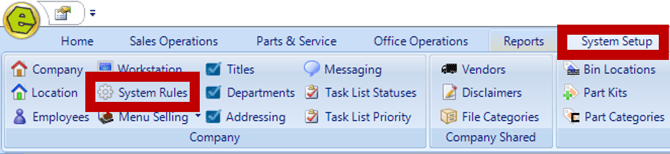
1. Navigate to the System Setup Tab and select System Rules
2. Locate Rule
-
InternalSold - determines which Payment Type must be used when an Internal Repair Order is associated with a unit that has already been sold
-
InternalUnitReq - determines whether the unit must have an "In Stock" Status before an Internal Repair Order can be processed.

3. Double-click to open the Rule
4. Key Answer 1 for InternalSold
InternalSold Answer Options
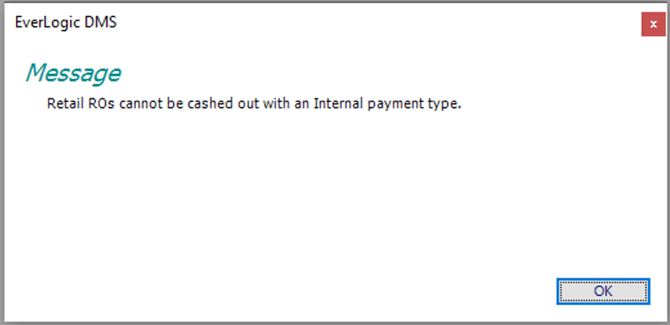
Answer 0 - A standard Internal Payment Type cannot be used because the unit has already been sold. The user may receive the following message:
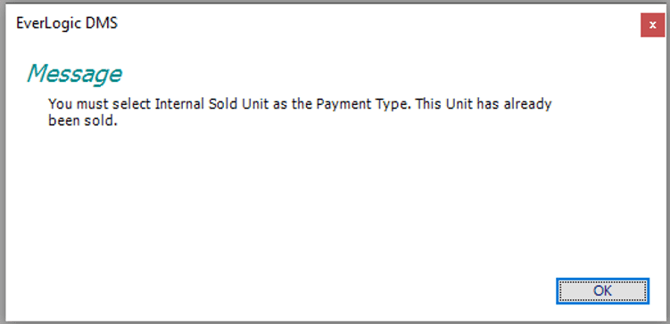
Answer 1 — Recommended - The system requires the Internal Sold Unit Payment Type when the unit has already been sold. The user may receive the following message if another Payment Type is selected:
4. Click OK
Key Answer 0 for InternalUnitReq
InternalUnitReq Answer Options
Answer 0 - Recommended - This setting allows an Internal Repair Order to be processed after the unit has been sold and is no longer listed as "In Stock".
Answer 1 - The unit must have an In Stock status before the Internal Repair Order can be processed.
5. Click OK
6. Save

NOTE: DO NOT add an Internal Sold Unit Repair Order Type
The system is now configured to allow Internal Repair Orders for sold units while requiring the Internal Sold Unit Payment Type.
Process the Internal Repair Order
- Open the sold unit using the dealership’s normal repair order workflow.
- Create the repair order using the normal Internal Repair Order Type.
- Add the required parts, labor, fees, or other applicable charges.
- Complete the repair order as usual.
Do not create or select a separate repair order type called Internal Sold Unit.
Close the Repair Order
When the repair order is ready to be closed:
- Open the payment or cash-out section of the repair order.
- Select Internal Sold Unit as the payment type.
- Confirm that the full repair order balance is assigned correctly.
- Complete the cash-out process.
If a standard Internal Payment Type is selected, the system may prevent the repair order from being closed and require the Internal Sold Unit Payment Type instead.
How the Charges Are Handled Standard Internal Charges
-
Charges closed with a standard Internal Payment Type are normally added to the unit’s inventory cost.
-
The charges remain on the balance sheet as part of the inventory asset until the unit is sold. When the sale is posted, the inventory cost is moved from the asset account to Cost of Goods Sold.
-
Because the unit has already been sold, additional charges should not be added back to its inventory value.
Internal Sold Unit Charges
-
Charges closed with the Internal Sold Unit Payment Type bypass the unit’s inventory balance.
-
The charges are posted to the account configured for the Internal Sold Unit Payment Type and may appear directly on the Profit and Loss statement or in the applicable Cost of Goods Sold account.
-
The exact accounting result depends on the Dealership’s Payment Type and account configuration.
Important: Do not add new Itemized Charges to the original vehicle sale after the sale has been completed. Process the additional work through the repair order using the appropriate Payment Type.
Internal Sold Unit Versus Goodwill
-
Use Internal Sold Unit when the dealership is paying for internal work associated with a unit that has already been sold.
-
A Goodwill Payment Type may be used when the dealership chooses to cover a Customer repair as a goodwill expense, to allow amount as a tax write-off.
-
These Payment Types may post to different accounting accounts and should not automatically be treated as interchangeable.
-
Confirm the correct Payment Type and accounting treatment with the Dealership’s Accounting Team.
What Happens Next
After the repair order is closed with the Internal Sold Unit Payment Type:
- The repair order is completed.
- The charges are not added to the sold unit’s inventory value.
- The charges post according to the accounting setup assigned to the Internal Sold Unit Payment Type.
- The repair order remains available in the unit and Customer history, where applicable.